
Download Filen – Free Secure File Management for Mac
Overview
Filen is a lightweight, free file‑management utility built exclusively for macOS. In a world where the native Finder can feel cluttered or sluggish, Filen steps in with a purpose‑driven design that keeps the most common file operations—copy, move, delete, rename, and create folders—just a click away. The application’s interface follows Apple’s Human Interface Guidelines, offering a clean sidebar, context‑aware toolbars, and keyboard shortcuts that seasoned Mac users will recognize instantly.
What sets Filen apart is its focus on speed and simplicity; there are no hidden ads, no forced cloud subscriptions, and no unnecessary bloat. The software runs as a native .app bundle, meaning it launches instantly, consumes minimal RAM, and integrates seamlessly with macOS features such as Quick Look, Spotlight, and the Services menu. Whether you’re a student juggling lecture notes, a photographer organizing RAW files, or a developer handling multiple code repositories, Filen provides a reliable, secure environment to keep your digital workspace orderly.
Its free‑to‑use license makes it an attractive alternative for anyone who wants a more efficient way to navigate their file system without paying for premium tiers or dealing with subscription‑based cloud services. In short, Filen delivers a no‑frills, performance‑first experience that respects both the Mac ecosystem and the user’s time.
Key Features
- Dual‑Pane Navigation: View two directories side‑by‑side for effortless drag‑and‑drop file transfers.
- Batch Operations: Select multiple items and execute copy, move, or delete with a single command.
- Quick Rename & Tagging: Inline renaming and optional color‑coded tags help you locate files faster.
- Integrated Search: Real‑time filtering based on name, type, or date without leaving the app.
- Customizable Toolbar: Drag your most used actions to the toolbar for one‑click access.
- Keyboard‑Centric Workflow: Full support for macOS shortcuts like ⌘C, ⌘V, ⌥⌘N, and custom hotkeys.
- Secure Deletion: Optional secure erase that overwrites files to prevent recovery.
- Dark Mode Compatibility: Automatic adaptation to macOS appearance settings.
- Auto‑Update Checker: Background checks ensure you’re always running the latest stable build.
- Free & Open‑Source Core: No hidden fees, no subscription traps, and a transparent development roadmap.
Installation & Usage Guide
Getting started with Filen is straightforward. First, visit the official website or the Mac App Store and click the “Download” button. The installer arrives as a compressed .dmg file. Open the .dmg, then drag the Filen.app icon into your Applications folder. macOS may warn you that the app is from an unidentified developer; simply open System Preferences → Security & Privacy and allow the app to run. Once installed, launch Filen from Launchpad or Spotlight.
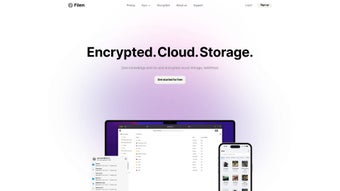
Upon first launch, Filen asks for permission to access your Documents, Desktop, and Downloads folders. This is required for full functionality and complies with Apple’s privacy standards. After granting access, you’ll be greeted by the main window: a two‑pane explorer with a left‑hand sidebar showing favorite locations and recent folders. To navigate, click any folder in the sidebar or use the breadcrumb trail at the top of each pane.
Common tasks are performed through the toolbar or right‑click context menu. For example, to move a file, select it, then click the “Move” icon or press ⌥⌘M. A dialog appears, allowing you to choose the destination pane. Deleting files follows the same pattern; choose “Delete” or press ⌘Delete, and confirm the action. If you enable Secure Deletion in preferences, the app will overwrite the data before removal.
Filen also supports batch renaming: select multiple items, right‑click, and choose “Rename”. A modal window offers sequential numbering, find‑and‑replace, or custom patterns. For power users, the Preferences panel (⚙️ icon) lets you configure default download folders, adjust hotkeys, and toggle the auto‑update feature. All settings are stored in the user’s Library folder, ensuring they persist across macOS upgrades.
Pros and Cons (and System Compatibility)
Pros
- Free and ad‑free: No hidden costs or intrusive advertisements.
- Fast performance: Minimal RAM usage and instant launch times.
- Intuitive UI: Familiar macOS look and feel reduces learning curve.
- Powerful batch tools: Handles large numbers of files with ease.
- Secure deletion option: Protects sensitive data from recovery.
- Regular updates: Automatic background checks keep the app current.
Cons
- Mac‑only: No Windows, Linux, Android, or iOS versions available yet.
- Limited cloud integration: Focuses on local file management; no built‑in sync features.
- Feature set is core‑focused: Advanced users may miss built‑in image preview or archive extraction tools.
- No native scripting support: Automation must rely on macOS Automator or AppleScript externally.
Frequently Asked Questions & Final Thoughts
Is Filen completely free or does it have a premium tier?
Filen is 100 % free. All core features—including dual‑pane navigation, batch operations, and secure deletion—are available without any subscription or in‑app purchases.
Can Filen handle hidden files and system folders?
Yes. By enabling “Show hidden files” in the Preferences panel, Filen reveals files that start with a dot (.) and lets you manage system‑level directories, provided you have the necessary permissions.
Does Filen integrate with macOS Spotlight?
Filen respects Spotlight indexing. Files moved or renamed within Filen are instantly re‑indexed, making them searchable through the regular macOS Spotlight interface.
How does Filen ensure data security during deletion?
When Secure Deletion is enabled, Filen overwrites the file’s storage blocks with random data three times before removing the reference from the file system, complying with common data‑sanitization standards.
Will Filen work on the latest macOS Ventura and future releases?
The development team monitors Apple’s OS releases closely. Filen receives regular compatibility updates, and the auto‑update feature ensures you receive patches for Ventura, Monterey, and upcoming macOS versions shortly after they are released.
In conclusion, Filen offers a compelling mix of speed, simplicity, and security for anyone looking to streamline their macOS file‑management workflow. Its free‑to‑use model, combined with a well‑thought‑out feature set, makes it an excellent addition to any Mac user’s toolkit. If you’re ready to replace a sluggish Finder experience with a responsive, purpose‑built utility, click the download button below and start organizing your files with confidence.







